| QuietJourney Forums | |
|
QuietJourney FAQ >> QuietJourney Help* >> Inserting pictures into posts - revisited
https://quietjourney.com/community/YABB.cgi?num=1189463037 Message started by db on Sep 10th, 2007 at 10:23pm |
|
|
Title: Inserting pictures into posts - revisited Post by db on Sep 10th, 2007 at 10:23pm
The easy (paper clip icon) method:
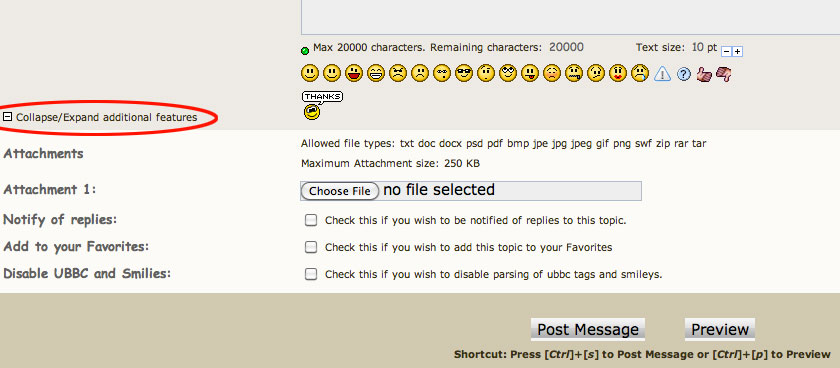
You can attach a single picture from your hard drive (provided it's under 250k in actual file size) to a post by using the "Attach" field after composing your post. When you click post, the file will be automatically uploaded to (and be hosted by) QJ's server. Important: If you attempt to upload any file over the accepted 250k size limit, you'll only be wasting your time so check the file size first! Hint: If you're the sort of person that likes to preview your posts, you'll need to reattach the image before posting. You can also "modify" your post after the fact if you discover you've messed up. Any one of many different graphics programs may be used to resize your images so I won't get into details on that. FWIW - (You need to Login or Register are good dimensions for comparison's sake. All the PODs people send in are processed using low to medium 'quality' (med-high jpg compression) and average around 50k. Another option: There are "free" sites like Photobucket, Flickr, ImageShack and many others that will host a bunch of images in a gallery you create. You can either post a link to your gallery, link to a specific photo or display images in your posts using the following (QJ specific - not recommended for use on other forums 'cause it'll look stupid there) code: Code (][img):
Additional information: (You need to Login or Register (You need to Login or Register If nothing above makes any sense to you, try something first anyway. Your efforts will not break anything on QJ. If you fail miserably and can't get additional advice by asking someone, e-mail a pic or two to me and I'll work something out for you. There's lots of different ways to accomplish the same thing. Some are easier than others. As always, detailed questions about specific problems, as well as help, ideas and hints from members are welcome. |
|
Title: Re: Inserting pictures into posts - revisited Post by prouboy on Mar 29th, 2009 at 11:12pm
db -- I failed miserably in my attempt to attach 3 jpegs in a reply regarding foodpacks. I had compressed all three files and they were on my desktop. But when I attached, only the last of the three showed up. What am I missing?
prouboy |
|
Title: Re: Inserting pictures into posts - revisited Post by PhantomJug on Mar 29th, 2009 at 11:15pm
Only 1 attachment per post if it's from your PC to the website. Use the 2nd method above if you want multiple pic's in a single post. However, once it's an attachment it then has it's own URL and can be inserted directly (again, with the code above).
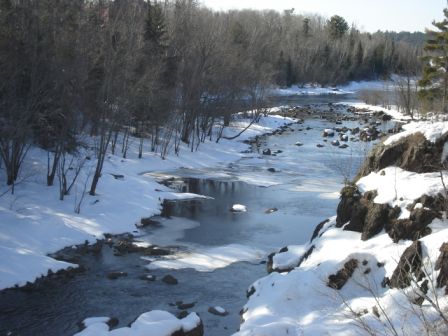
Like this. . . . deer_Jon_and_Will_007.jpg ( 31 KB | 2
Downloads ) |
|
Title: Re: Inserting pictures into posts - revisited Post by PhantomJug on Mar 29th, 2009 at 11:22pm |
|
Title: Re: Inserting pictures into posts - revisited Post by prouboy on Mar 30th, 2009 at 12:43am
Thanks PJ...I'll give it a try.
prouboy |
|
Title: Re: Inserting pictures into posts - revisited Post by pajeff on Jan 21st, 2010 at 1:39pm |
|
Title: Re: Inserting pictures into posts - revisited Post by DentonDoc on Jan 21st, 2010 at 8:03pm |
|
Title: Re: Inserting pictures into posts - revisited Post by db on Jan 22nd, 2010 at 5:26am |
|
Title: Re: Inserting pictures into posts - revisited Post by pajeff on Jan 22nd, 2010 at 11:37am |
|
Title: Re: Inserting pictures into posts - revisited Post by db on Jan 24th, 2010 at 6:34am
Ha, same page I found trying to define flester. Seemed right to me. ;)
|
|
Title: Re: Inserting pictures into posts - revisited Post by PJinHawaii on Feb 22nd, 2011 at 9:02pm I'm trying to do a post on the inukshuk forum. I'm trying to attach a JPG photo using method #1. the photo is 227 kb but it gets rejected saying it's about 222 kb too big. So I tried an even smaller image which was just 94 kb and it was also rejected saying it was 89 kb too big. It acts as if the size limit is just 5kb instead of 250 kb. Am I doing something wrong? |
|
Title: Re: Inserting pictures into posts - revisited Post by db on Feb 23rd, 2011 at 7:06am
When it says that the directory is full. I compressed a few 100 images tonight. That should last us a while.
|
|
Title: Re: Inserting pictures into posts - revisited 2014 Post by db on May 5th, 2014 at 8:15pm |
|
QuietJourney Forums » Powered by YaBB 2.6.0! YaBB Forum Software © 2000-2026. All Rights Reserved. |