Post by gymcoachdon on Aug 7th, 2017 at 2:55am
GoPro Hero 5 Black
I posted a link to videos from my June Quetico trip,
(You need to Login or Register
and there was some interest in what equipment and techniques I used. Getting decent fish pictures when paddling solo is tough, and this is the system I came up with.
The Camera:
After a bit of research, and going back and forth, I decided to purchase the newest version of the GoPro action camera. I will let you look up the specs if you are interested, but I paid $500 at REI, but was able to use some dividend money to ease the pain a bit. My reasoning to buy the newest version came down to a few major points. First was the voice commands. Being able to start and stop video, or take pictures, with a camera mounted in the bow of a solo canoe isn’t possible without some sort of remote control. Remotes are available for the Hero 5 and earlier versions, more on that later. Second major selling point was that the camera is waterproof without a housing. You still need to have a cage to mount the camera, but in previous versions, the waterproof case made recording sound impractical. I was happy with the audio quality, except in high winds.
I got the camera with plenty of time to test it out, and took it with me on a few paddles to learn how to best use it. My first disappointment came when I realized how short the battery life was going to be. Granted, I was using it a lot, and trying to utilize all the different settings, but the battery would die in about an hour and a half. Yes, 90 minutes. I decided to take it on a down river trip locally, and do some fishing, and that was when I realized that, although you can turn off the camera using voice command (to save battery life), you can’t turn it on using voice command! Hmmm, camera mounted on the bow thwart, turned off to save batteries, I would have to get out of the canoe, turn on the camera, and then turn it off with voice command. Now the voice command seemed useless, as I could have bought an earlier version, and saved a few hundred dollars (used), and got the smart remote. Well, the answer was to buy the voice activated remote, called Remo. Although this cost more than buying a used unit, I do have the better audio quality since a waterproof housing isn’t needed. With this set-up, I can turn the camera on and off, and switch from photo to video while paddling. The Remo will not allow me to change the field of view settings, or the video quality setting. The smart remote will allow you to change all settings remotely, and will work with the Hero 5.
Mounting the camera:
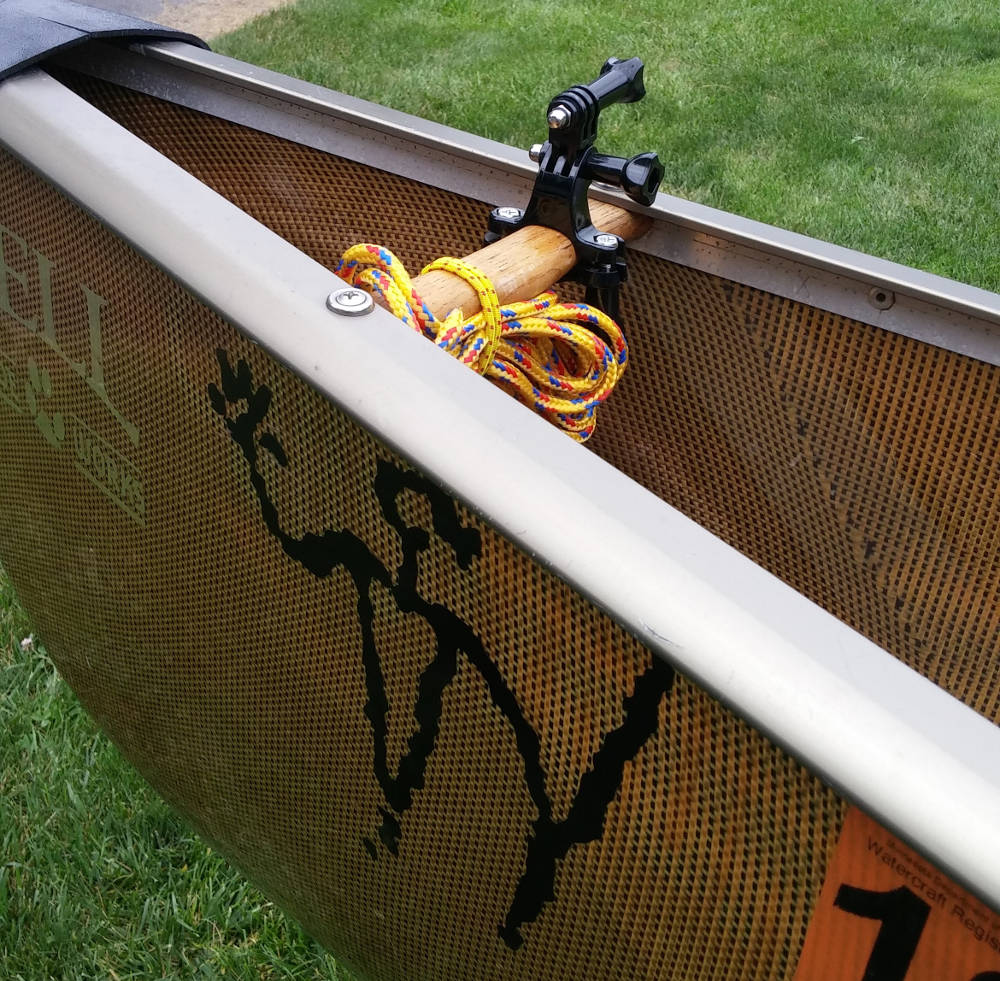
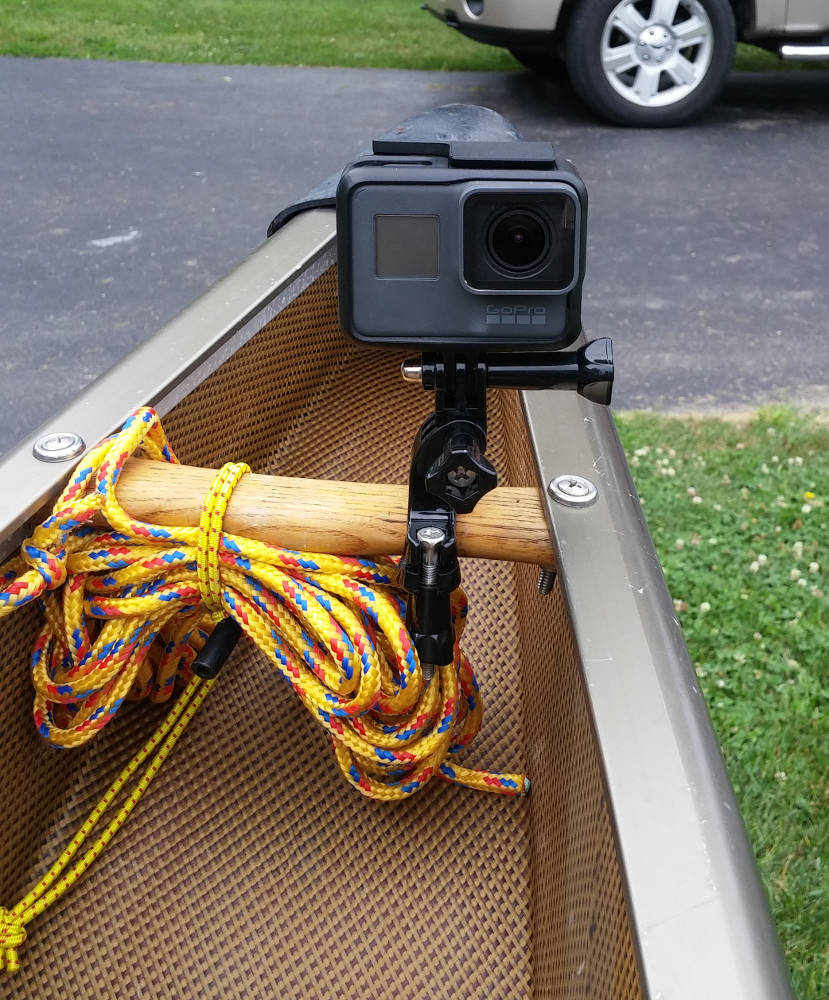
I used 2 different mounts while on the trip. One was a handlebar mount, which happened to fit the bow thwart of my Bell Magic perfectly. It did aim the camera slightly to one side, but with the wide field of view of these cameras, it wasn’t a problem. This was a solid mount, and I had zero concerns portaging with the camera mounted. It was also very easy to change the direction the camera was shooting.
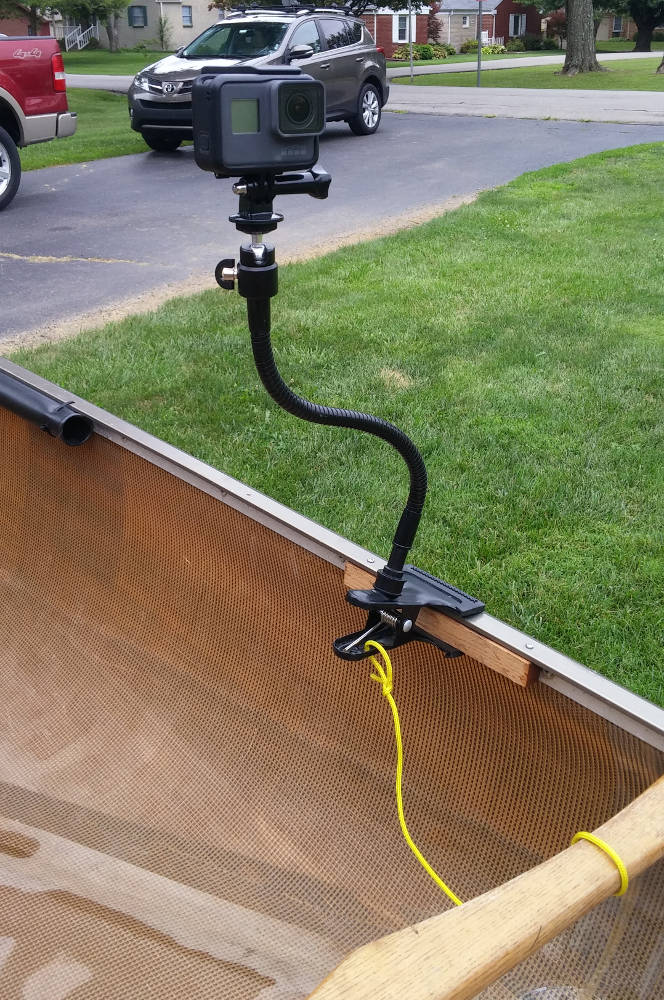
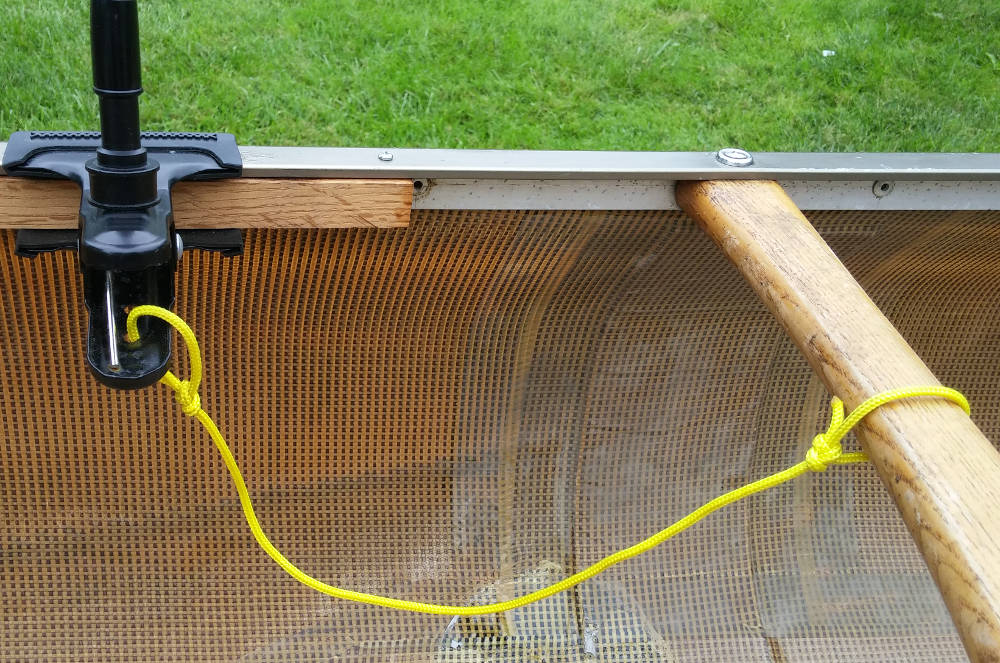
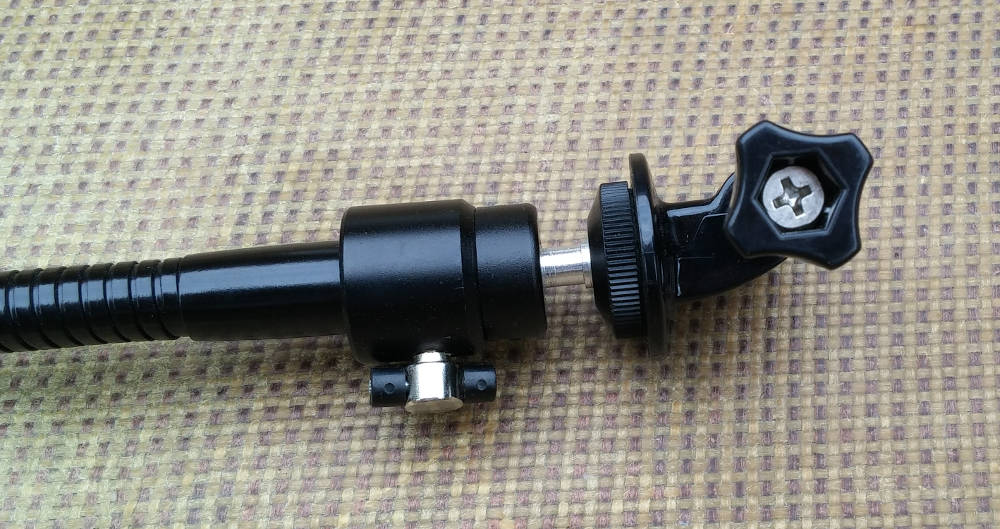
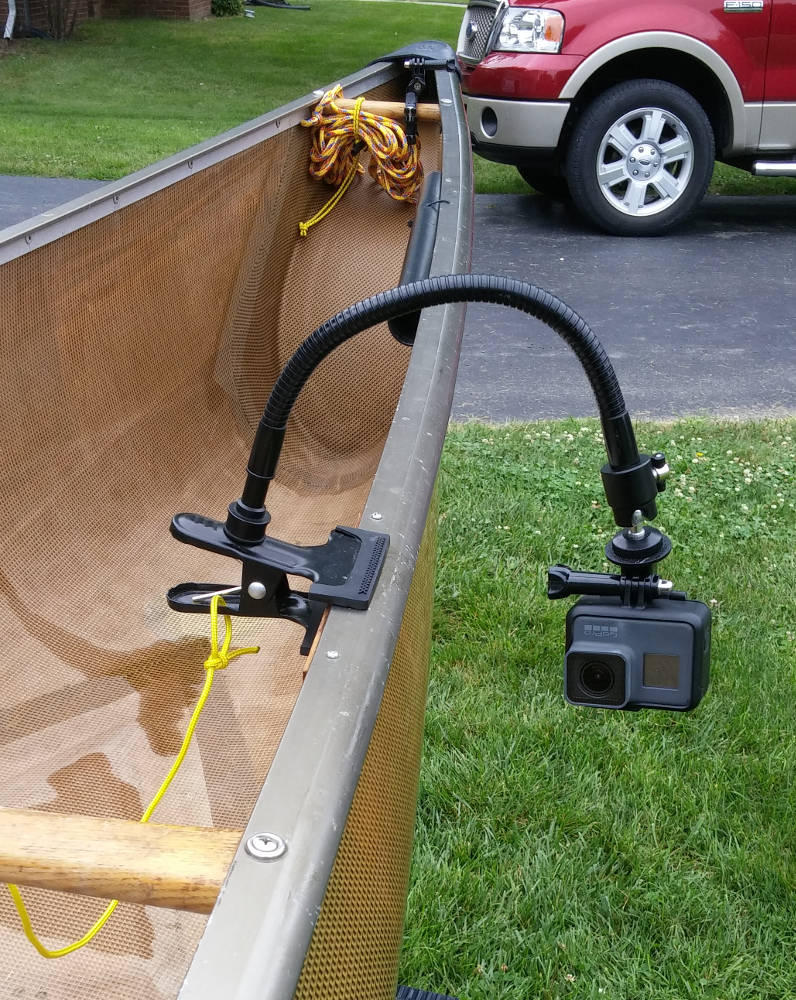
The other mount I used was a flexible rod mounted on a clamp. I have aluminum gunwales, and initially, the aluminum was so thin that the clamp just wouldn’t hold the camera securely. I fixed this by screwing a small strip of oak to the gunwale so that the clamp would have more spring tension. I also tied a leash from the clamp to the middle thwart, in case it let loose at the wrong time! I remember it falling off twice during the trip, and both times I am pretty sure it was my fault, as it wasn’t clamped on properly. Both times, it fell harmlessly into the canoe. I am also able to bend the rod to place the camera in a few different positions, for different shots. It has a ball mount, so the camera is easily tilted or rotated to wherever you need it. I would not portage with the camera in this position, and it made me alter my paddle path when switching sides, so it wasn’t used on travel days. When fishing, having it mounted there made it easy for me to reach the camera while in the canoe, if any adjustments were needed, like memory cards or fresh battery.
Memory cards:
I took four 64gb memory cards, and I had 2 16gb cards for my digital camera. The 64 gig cards seemed to be the current “best bang for your dollar” format. (meaning 32 gig cards weren’t ½ the price, and 128gb were more than double). I used 2 of the cards on an 8 day trip, but only had real use on 5 of the days. I also had about half the memory left on the 2nd card.
Batteries:
After my realization of the short battery life, I began looking for a way to keep the camera useful for an 8 day trip. When I bought the GoPro, it came with one battery, and I got a spare. I did some searching, and found some batteries and a charger from Wasabi Power. Through Amazon, I purchased 2 spare batteries and a charger capable of charging 3 batteries at once. This worked great, as I now had 4 batteries, and could charge one in the camera, and the other 3 in the Wasabi charger.
A word of warning about the Wasabi batteries. On one occasion prior to the trip, I put what I thought was a fully charged battery in the camera, and the GoPro said the battery was dead. I thought I had forgotten to charge it, and switched to a different battery. This happened again while on the trip on several occasions. I finally realized that it only occurred with the aftermarket batteries, and not with the original GoPro batteries. The fix was simple. Whenever it happened, I would turn off the camera, and turn it right back on. It seemed there was a communication problem with the camera reading the charge level, and not an actual problem with the battery. I labeled each battery 1 through 4, and always used them in numerical order. This ensures equal use of the batteries, and lets you know which batteries need charged when you get back to camp.
Charging:
I used an Anker PowerCore 20100 lithium battery to recharge all my electronics on the trip. This included the GoPro batteries (several times each), my digital camera (once), and my DeLorme InReach (topped it off 2 or 3 times). After the trip, I still had ½ the power left in this battery, and was able to use it a month later, without charging, to charge my phone when we lost power for 12 hours after a storm. I was very impressed with this product. The reasons I bought this model were: LED charge indicator lights. 4 lights for fully charged, 2 for half, etc. Easy to tell how much juice was left. 4.8A output, with 2 usb slots. I was able to charge 3 batteries in the charger, and my InReach at the same time. I could also hook up the camera to this battery, and shoot night time lapse photos, and be recharging something else. Weight was around 13 oz, and I paid $40 for it.
Case:
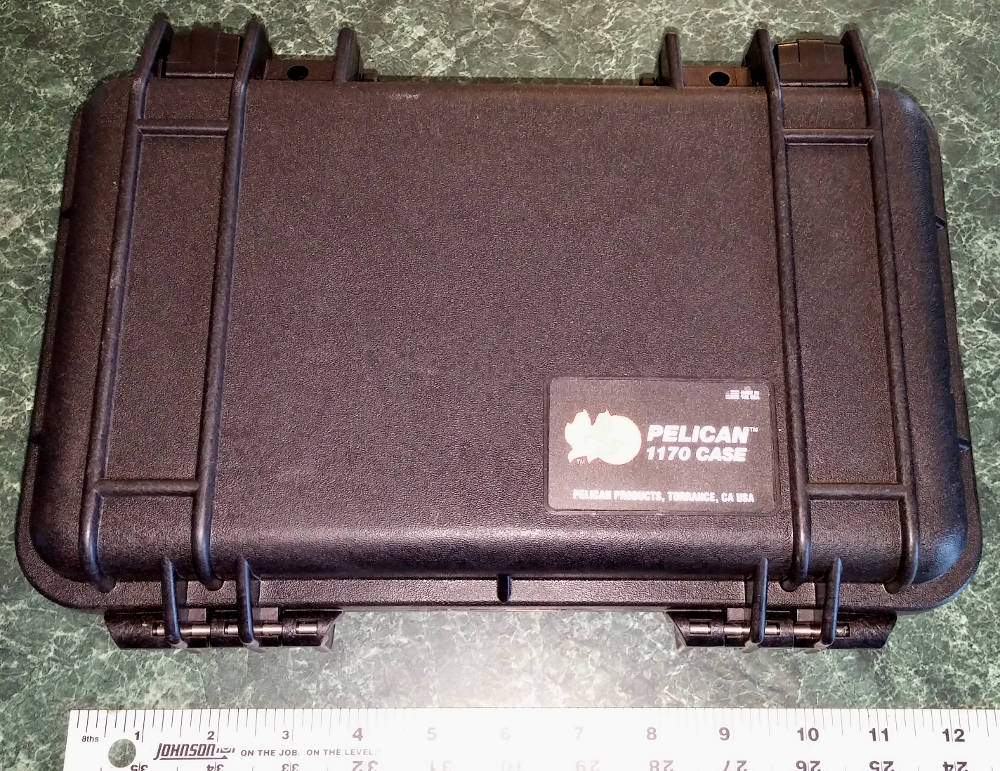
I carried everything I needed in a small Pelican 1170 case. Specs are as follows:
Specifications:
Interior (l/w/d): 10.54" x 6.04" x 3.16"
Exterior (l/w/d): 11.64" x 8.34" x 3.78"
Buoyancy Max: 7.25 lbs, 3.29 kg
Range Temp: -40 / 210 °F-40 / 99 °C
Lid / Bottom / Total Depth: 1.08" 2.7 cm / 2.08" 5.3 cm / 3.16" 8.0 cm
Weight: 2.10 lbs0.95 kg (with foam), 1.96 lbs0.89 kg (w/o foam)
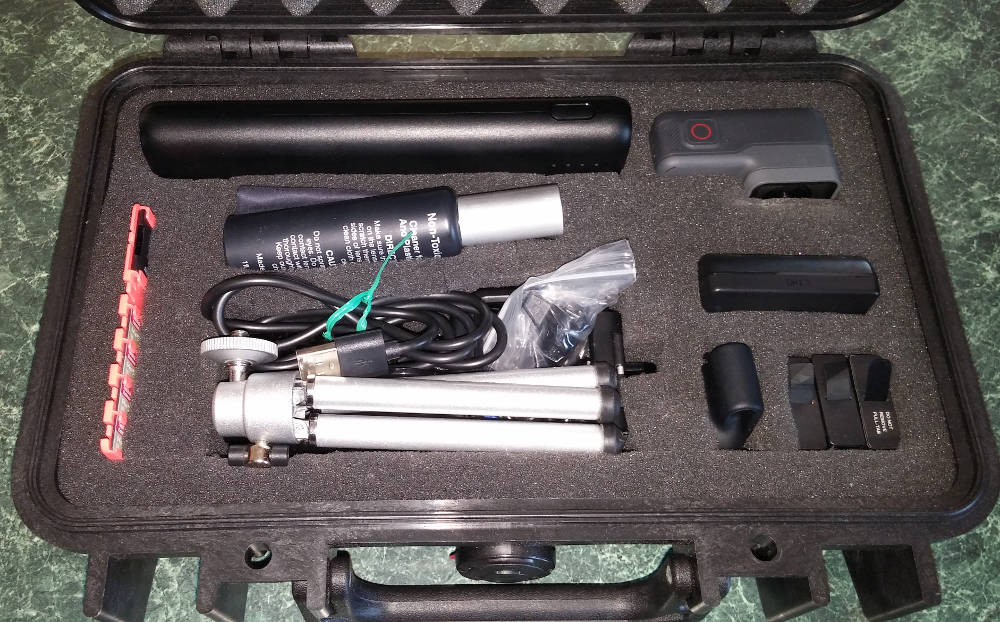
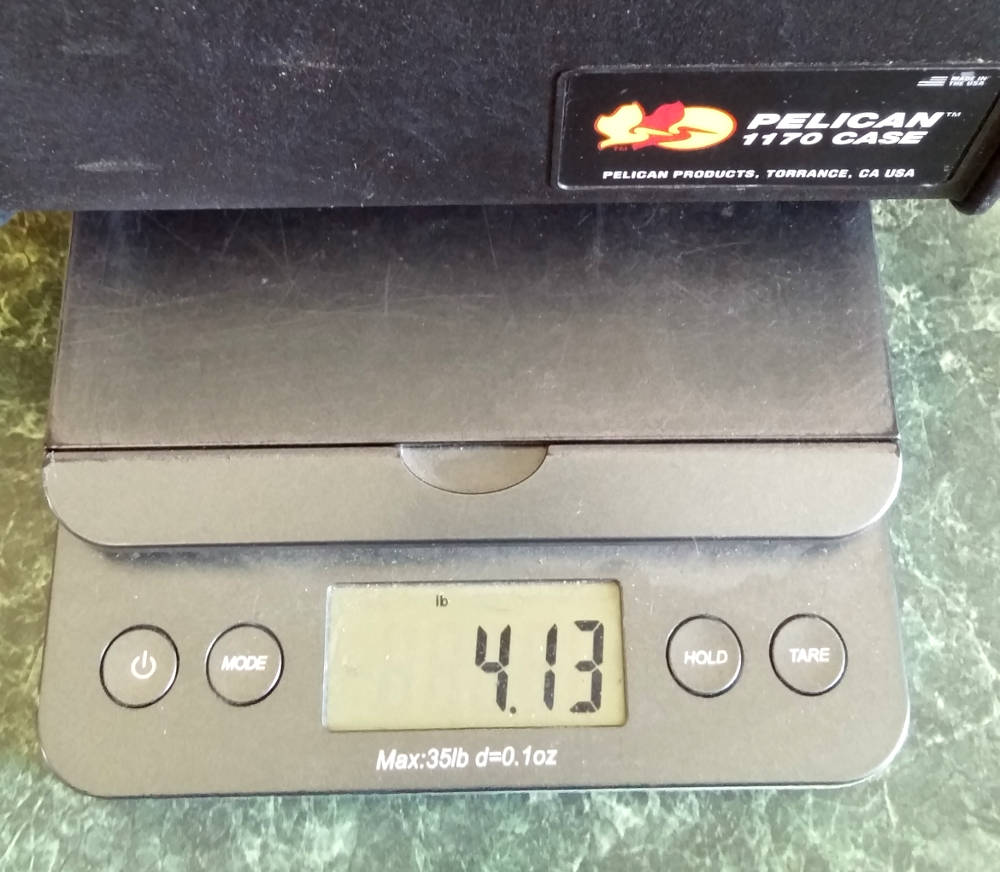
I had some extra mounting hardware, all the connectors/cables for charging, a (very) small tripod, batteries, memory cards...basically anything related to the camera, in this case. Weight was 4.13 lbs fully loaded. That was a significant addition to a solo trippers load. I am debating whether or not the gear will make the next trip, but I think it will.
Conclusion:
I was overall very pleased with how the system functioned, and the quality of the video and pictures. Changing settings, or direction the camera was facing required getting out of the canoe. That lead to me not getting some things on video if I didn’t want to mess with it. A fix for that problem would be a more secure mount within reach while paddling, although I’m still not sure I would take the time to change a battery if I had to dig the case out of a pack. If someone was focused on the video aspect of a trip, I’m sure there could be work-arounds, but I was there to paddle, observe nature, and fish.
The voice commands were about 80-90% accurate. Sometimes wind would make it difficult to get the camera to start or stop, but pushing the button on the remote will solve that. I wore the remote on the collar of my shirt, using the clip that comes with the Remo. It was very secure, and I never had issues with it moving or coming loose. It also comes with a wrist strap, but it was too big to strap to the thwart, so I used the clip. I am sure that the next time I trip with the camera, the hassles will be reduced.
Understand that the GoPro is an extreme wide angle camera, and will do landscape pictures, and up close and personal stuff well. Just don’t expect to get any wildlife photos unless they are in the canoe with you!
I’m sure I left out some really obvious stuff, so if you have any questions, remembering that I am certainly not an expert, I would be glad to help!
 gear.jpg ( 173 KB | 6
Downloads )
gear.jpg ( 173 KB | 6
Downloads )
caseopen.jpg ( 137 KB | 5
Downloads )
I posted a link to videos from my June Quetico trip,
(You need to Login or Register
and there was some interest in what equipment and techniques I used. Getting decent fish pictures when paddling solo is tough, and this is the system I came up with.
The Camera:
After a bit of research, and going back and forth, I decided to purchase the newest version of the GoPro action camera. I will let you look up the specs if you are interested, but I paid $500 at REI, but was able to use some dividend money to ease the pain a bit. My reasoning to buy the newest version came down to a few major points. First was the voice commands. Being able to start and stop video, or take pictures, with a camera mounted in the bow of a solo canoe isn’t possible without some sort of remote control. Remotes are available for the Hero 5 and earlier versions, more on that later. Second major selling point was that the camera is waterproof without a housing. You still need to have a cage to mount the camera, but in previous versions, the waterproof case made recording sound impractical. I was happy with the audio quality, except in high winds.
I got the camera with plenty of time to test it out, and took it with me on a few paddles to learn how to best use it. My first disappointment came when I realized how short the battery life was going to be. Granted, I was using it a lot, and trying to utilize all the different settings, but the battery would die in about an hour and a half. Yes, 90 minutes. I decided to take it on a down river trip locally, and do some fishing, and that was when I realized that, although you can turn off the camera using voice command (to save battery life), you can’t turn it on using voice command! Hmmm, camera mounted on the bow thwart, turned off to save batteries, I would have to get out of the canoe, turn on the camera, and then turn it off with voice command. Now the voice command seemed useless, as I could have bought an earlier version, and saved a few hundred dollars (used), and got the smart remote. Well, the answer was to buy the voice activated remote, called Remo. Although this cost more than buying a used unit, I do have the better audio quality since a waterproof housing isn’t needed. With this set-up, I can turn the camera on and off, and switch from photo to video while paddling. The Remo will not allow me to change the field of view settings, or the video quality setting. The smart remote will allow you to change all settings remotely, and will work with the Hero 5.
Mounting the camera:
I used 2 different mounts while on the trip. One was a handlebar mount, which happened to fit the bow thwart of my Bell Magic perfectly. It did aim the camera slightly to one side, but with the wide field of view of these cameras, it wasn’t a problem. This was a solid mount, and I had zero concerns portaging with the camera mounted. It was also very easy to change the direction the camera was shooting.
The other mount I used was a flexible rod mounted on a clamp. I have aluminum gunwales, and initially, the aluminum was so thin that the clamp just wouldn’t hold the camera securely. I fixed this by screwing a small strip of oak to the gunwale so that the clamp would have more spring tension. I also tied a leash from the clamp to the middle thwart, in case it let loose at the wrong time! I remember it falling off twice during the trip, and both times I am pretty sure it was my fault, as it wasn’t clamped on properly. Both times, it fell harmlessly into the canoe. I am also able to bend the rod to place the camera in a few different positions, for different shots. It has a ball mount, so the camera is easily tilted or rotated to wherever you need it. I would not portage with the camera in this position, and it made me alter my paddle path when switching sides, so it wasn’t used on travel days. When fishing, having it mounted there made it easy for me to reach the camera while in the canoe, if any adjustments were needed, like memory cards or fresh battery.
Memory cards:
I took four 64gb memory cards, and I had 2 16gb cards for my digital camera. The 64 gig cards seemed to be the current “best bang for your dollar” format. (meaning 32 gig cards weren’t ½ the price, and 128gb were more than double). I used 2 of the cards on an 8 day trip, but only had real use on 5 of the days. I also had about half the memory left on the 2nd card.
Batteries:
After my realization of the short battery life, I began looking for a way to keep the camera useful for an 8 day trip. When I bought the GoPro, it came with one battery, and I got a spare. I did some searching, and found some batteries and a charger from Wasabi Power. Through Amazon, I purchased 2 spare batteries and a charger capable of charging 3 batteries at once. This worked great, as I now had 4 batteries, and could charge one in the camera, and the other 3 in the Wasabi charger.
A word of warning about the Wasabi batteries. On one occasion prior to the trip, I put what I thought was a fully charged battery in the camera, and the GoPro said the battery was dead. I thought I had forgotten to charge it, and switched to a different battery. This happened again while on the trip on several occasions. I finally realized that it only occurred with the aftermarket batteries, and not with the original GoPro batteries. The fix was simple. Whenever it happened, I would turn off the camera, and turn it right back on. It seemed there was a communication problem with the camera reading the charge level, and not an actual problem with the battery. I labeled each battery 1 through 4, and always used them in numerical order. This ensures equal use of the batteries, and lets you know which batteries need charged when you get back to camp.
Charging:
I used an Anker PowerCore 20100 lithium battery to recharge all my electronics on the trip. This included the GoPro batteries (several times each), my digital camera (once), and my DeLorme InReach (topped it off 2 or 3 times). After the trip, I still had ½ the power left in this battery, and was able to use it a month later, without charging, to charge my phone when we lost power for 12 hours after a storm. I was very impressed with this product. The reasons I bought this model were: LED charge indicator lights. 4 lights for fully charged, 2 for half, etc. Easy to tell how much juice was left. 4.8A output, with 2 usb slots. I was able to charge 3 batteries in the charger, and my InReach at the same time. I could also hook up the camera to this battery, and shoot night time lapse photos, and be recharging something else. Weight was around 13 oz, and I paid $40 for it.
Case:
I carried everything I needed in a small Pelican 1170 case. Specs are as follows:
Specifications:
Interior (l/w/d): 10.54" x 6.04" x 3.16"
Exterior (l/w/d): 11.64" x 8.34" x 3.78"
Buoyancy Max: 7.25 lbs, 3.29 kg
Range Temp: -40 / 210 °F-40 / 99 °C
Lid / Bottom / Total Depth: 1.08" 2.7 cm / 2.08" 5.3 cm / 3.16" 8.0 cm
Weight: 2.10 lbs0.95 kg (with foam), 1.96 lbs0.89 kg (w/o foam)
I had some extra mounting hardware, all the connectors/cables for charging, a (very) small tripod, batteries, memory cards...basically anything related to the camera, in this case. Weight was 4.13 lbs fully loaded. That was a significant addition to a solo trippers load. I am debating whether or not the gear will make the next trip, but I think it will.
Conclusion:
I was overall very pleased with how the system functioned, and the quality of the video and pictures. Changing settings, or direction the camera was facing required getting out of the canoe. That lead to me not getting some things on video if I didn’t want to mess with it. A fix for that problem would be a more secure mount within reach while paddling, although I’m still not sure I would take the time to change a battery if I had to dig the case out of a pack. If someone was focused on the video aspect of a trip, I’m sure there could be work-arounds, but I was there to paddle, observe nature, and fish.
The voice commands were about 80-90% accurate. Sometimes wind would make it difficult to get the camera to start or stop, but pushing the button on the remote will solve that. I wore the remote on the collar of my shirt, using the clip that comes with the Remo. It was very secure, and I never had issues with it moving or coming loose. It also comes with a wrist strap, but it was too big to strap to the thwart, so I used the clip. I am sure that the next time I trip with the camera, the hassles will be reduced.
Understand that the GoPro is an extreme wide angle camera, and will do landscape pictures, and up close and personal stuff well. Just don’t expect to get any wildlife photos unless they are in the canoe with you!
I’m sure I left out some really obvious stuff, so if you have any questions, remembering that I am certainly not an expert, I would be glad to help!
gear.jpg ( 173 KB | 6
Downloads )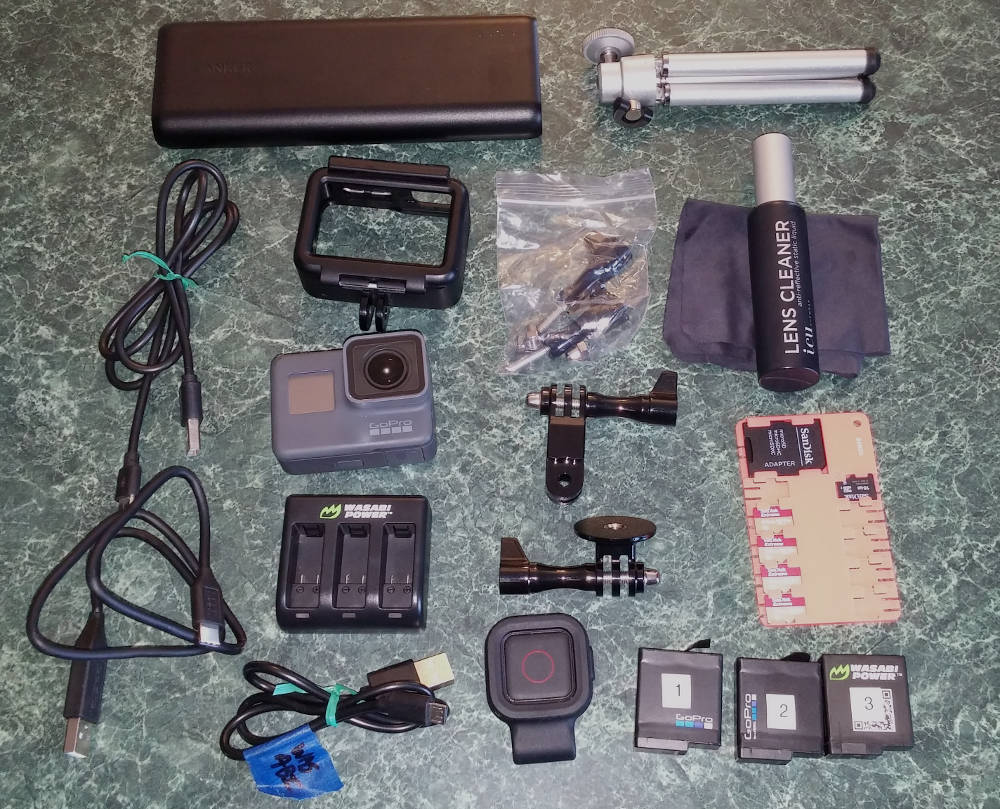 caseopen.jpg ( 137 KB | 5
Downloads )
caseopen.jpg ( 137 KB | 5
Downloads )